













TL;DR: Make.com is the best no code automation platform for most people in 2026. It offers a visual builder with branching logic, 1,500+ integrations, and a free tier that actually lets you build real workflows. Zapier is simpler but more expensive, better if you want basic two step automations and don’t care about cost. n8n is the most powerful option but requires self hosting and technical setup, making it best for developers who want full control. For small businesses and solo operators who need to automate repetitive tasks without writing code, Make.com hits the right balance of power, flexibility, and price. Start with Make.com’s free plan, move to Zapier if you want less complexity, or n8n if you want zero vendor lock in and don’t mind managing your own server.
Make.com vs Zapier vs n8n in 2026: Which Automation Tool Do You Actually Need?
Best for: Anyone comparing automation platforms who’s tired of overpaying for Zapier and wants to know what actually works at scale in 2026.
Not ideal for: People looking for AI agent platforms that act autonomously. That’s a different category entirely. Check our OpenClaw guide or Hermes Agent guide instead.
Most people find out about automation tools the same way. Zapier shows up in a YouTube video or a productivity blog. You sign up. You build a few workflows. Everything’s fine.
Then the bill starts climbing. Or you try building something with more than four steps and realize the tool is fighting you. Or you hit a wall where branching logic should be simple but the interface treats it like brain surgery.
That’s when you start Googling “Zapier alternatives” and land on Make.com and n8n.
We’ve been running all three across real workflows for the past several months: email sequences, CRM syncs, content pipelines, lead capture, client onboarding, social monitoring. Not demo scenarios. Actual business processes that break when they fail.
Here’s everything we found. Including the stuff the official comparison pages conveniently leave out.
Make.com vs Zapier vs n8n: Quick Comparison Table
| Feature | Make.com | Zapier | n8n |
|---|---|---|---|
| Best for | Power users who want visual workflows at fair pricing | Beginners who need something working in 5 minutes | Developers and teams who need full control |
| Pricing | From $9/mo (10,000 ops) | From $19.99/mo (750 tasks) | Free (self-hosted) or $20/mo (cloud) |
| Free tier | 1,000 operations | 100 tasks | Unlimited (self-hosted) |
| App integrations | 1,800+ native | 7,000+ native | 400+ native (unlimited via HTTP) |
| Workflow style | Visual canvas with branching | Linear step-by-step | Visual canvas with branching |
| AI features | Maia builder (early access) | Copilot (describe in English) | Native LangChain nodes |
| Self-hosting | No | No | Yes (Docker, npm) |
| Data privacy | Cloud only | Cloud only | Full control (self-hosted) |
| Learning curve | Medium | Low | High (self-hosted), Medium (cloud) |
| Error handling | Built-in visual debugging | Basic retry/error paths | Advanced with custom logic |
| Our rating | 4.5/5 | 4.0/5 | 4.3/5 (technical users) |
That’s the short version. The rest of this article explains why those numbers matter and which tool actually fits what you’re trying to do.
What Make.com, Zapier and n8n Actually Do
All three solve the same core problem: they connect your apps and automate the tasks between them so you stop doing repetitive work manually.
Someone fills out a form on your website. The automation captures that data, adds it to your CRM, sends a welcome email, notifies your team on Slack, and logs the lead in a spreadsheet. All while you’re somewhere else. That’s the pitch for all of them. They all deliver on it.
Where they split is in three places: how they handle complexity, what they cost when you actually scale, and how much control they give you over what’s happening under the hood.
Zapier: The One Everyone Starts With
Zapier built this category. It’s still the first name most people hear when automation comes up, and there’s a reason for that. The interface is clean, the setup holds your hand through everything, and you can genuinely have something working in under five minutes.
The app library is what keeps people locked in. 7,000+ native integrations means if a tool exists, Zapier probably connects to it. Niche CRMs nobody has heard of. Legacy accounting software from 2015. Random SaaS tools with 200 users. Zapier has them all. G2 rates it 4.5 out of 5 from over 1,500 reviews and the ease of use scores are consistently the highest of the three.
Where Zapier Falls Apart
The pricing model.
Zapier charges per task, meaning every action in every workflow counts against your monthly quota. A five step workflow running 1,000 times per month consumes 5,000 tasks. At the Starter tier ($19.99/mo for 750 tasks), you blow through your entire monthly allowance with a single moderately active workflow.
We ran the numbers ourselves. A lead capture workflow that cost roughly $49/month on Zapier (Professional tier to get enough tasks) cost $9/month on Make.com doing the exact same job. One independent reviewer built the same 20 workflows on both platforms and found Make costs 5 to 7 times less for equivalent work. Those numbers match what we saw.
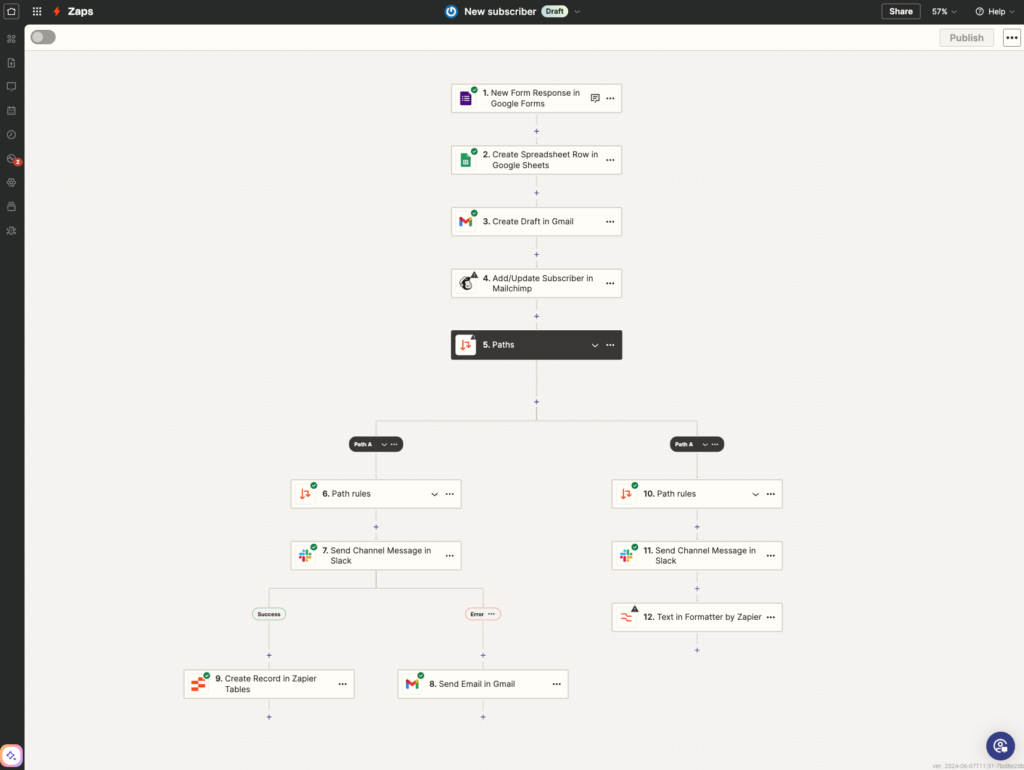
Then there’s the architecture problem. Zapier workflows are linear. Trigger happens, step 1 runs, step 2 runs, step 3 runs, done. The moment you need branching logic (“if the lead is from California do X, if from New York do Y”), error handling (“if the CRM is down, retry in 5 minutes then alert me”), or parallel processing (“do these three things at the same time”), Zapier gets clunky. It can technically do these things with Paths and Filters. But the interface wasn’t built for it. And every additional step costs more money.
Zapier’s AI Play
Zapier Copilot lets you describe a workflow in plain English and it builds the Zap. “When someone fills out my Typeform, add them to Mailchimp and send a Slack message to #new-leads.” It generates the workflow, you review it, one click to activate. For simple automations this genuinely saves setup time. For anything complex you’re still building manually.
Where Zapier Still Wins (Credit Where It’s Due)
The template library. Thousands of pre-built workflows you activate with one click. “New Typeform response to Google Sheet row” takes 90 seconds. “Stripe payment to QuickBooks invoice” is three clicks. For common workflows between popular apps, nothing beats grabbing a Zapier template and being done.
Multi-step Zaps also handle sequential logic well. If your workflow is “do A then B then C then D,” Zapier executes it reliably with minimal configuration. The problem only shows up when your workflow needs to be “do A, then if X do B, if Y do C, and also do D at the same time.”
Zapier Tables is worth knowing about too. It’s a lightweight database built into Zapier that lets you store, retrieve, and update structured data inside your workflows. For simple use cases (tracking processed leads, logging automation results), it removes the need for a separate Airtable or Google Sheet in the chain.
Who Should Use Zapier
You’ve never automated anything before. You need something working today, not next week. Your workflows are simple (five steps or fewer). You use niche tools that only Zapier integrates with. You value simplicity over cost efficiency. Accept going in that you’ll probably outgrow it within 6 to 12 months if automation becomes a meaningful part of how you work.
Make.com: The Power User’s Choice
Make.com (formerly Integromat) is where most people end up when Zapier’s pricing becomes painful or their workflows outgrow what a linear tool can handle. We made that switch eight months ago. Haven’t looked back.
The Visual Canvas Changes Everything
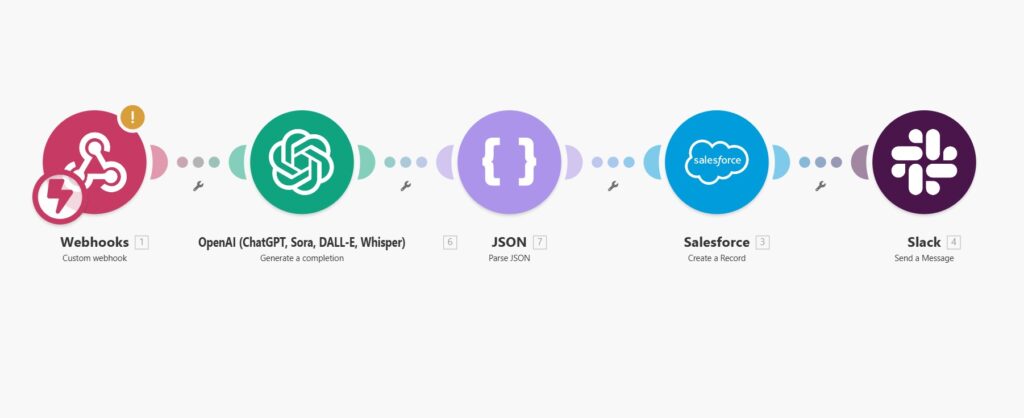
Instead of building workflows as a list of steps, Make.com builds them as visual diagrams. Every connection, every branch, every condition visible on one screen. You see the entire logic of a complex workflow at a glance. When something breaks, you click the failed module and see exactly what data went in, what came out, and where the error happened. When you want to add a branch, you drag a new connection from any point in the flow.
This sounds like a minor UI difference. It isn’t. The moment your workflows have more than four or five steps, the visual approach is dramatically more productive than navigating nested menus and linear step lists. You think in flows. Make lets you build in flows.
Make.com Pricing: The Number That Actually Matters
| Plan | Price | Operations | Per Operation Cost |
|---|---|---|---|
| Free | $0 | 1,000/mo | $0 |
| Core | $9/mo | 10,000/mo | $0.0009 |
| Pro | $16/mo | 10,000/mo + advanced features | $0.0016 |
| Teams | $29/mo | 10,000/mo + collaboration | $0.0029 |
| Enterprise | Custom | Custom | Custom |
Compare that to Zapier:
| Plan | Price | Tasks | Per Task Cost |
|---|---|---|---|
| Free | $0 | 100/mo | $0 |
| Starter | $19.99/mo | 750/mo | $0.027 |
| Professional | $49/mo | 2,000/mo | $0.025 |
| Team | $69/mo | 2,000/mo + collaboration | $0.035 |
Make.com’s free tier gives you 10x more operations than Zapier’s free tier. The paid entry point ($9 vs $19.99) gives you 13x more operations for half the price. At scale, Make.com is 5 to 10x cheaper depending on how your workflows are structured.
The “operations” vs “tasks” distinction matters too. Zapier counts every action as a task. Make counts operations differently and more favorably for complex workflows. A filter step that doesn’t match doesn’t count as an operation on Make. On Zapier, that filter still counts as a task.
The Learning Curve Is Real (But Worth It)
Make isn’t hard. But it’s not as guided as Zapier. You need to understand how modules connect, how data mapping works between steps, and how to think in branching logic. Most people who commit to learning it say the investment pays off within the first month. Make Academy covers everything in a few hours and it’s free.
We found that building a basic workflow (form submission to CRM to email) takes about 15 minutes on a first try. A complex multi-branch workflow with error handling takes a few hours on a first attempt. That same workflow in Zapier? Days of frustration trying to force branching logic into a linear model. Then a higher bill at the end.
Make.com’s AI Play
Maia is Make’s AI workflow builder, currently in early access. Same promise as Zapier Copilot: describe what you want and it builds it. From what we’ve seen so far, it’s behind Zapier’s implementation. Not broken. Just not ready. Make is catching up here but isn’t ahead yet.
Who Should Use Make.com
Your Zapier bill is climbing faster than your revenue. Your workflows need branching, conditions, error handling, or parallel processing. You want to see your entire automation logic on one screen instead of scrolling through step lists. You’re comfortable with a slightly steeper learning curve in exchange for dramatically more capability and lower costs. You’re building AI automation services for clients and need margins that Zapier’s per-task pricing destroys.
For most people reading this, Make.com is the right answer.
n8n: The One for People Who Want Full Control
n8n is the outlier in this comparison. It isn’t for everyone. But for the right person, it’s the most powerful option by a margin that isn’t close.
The Open Source Advantage
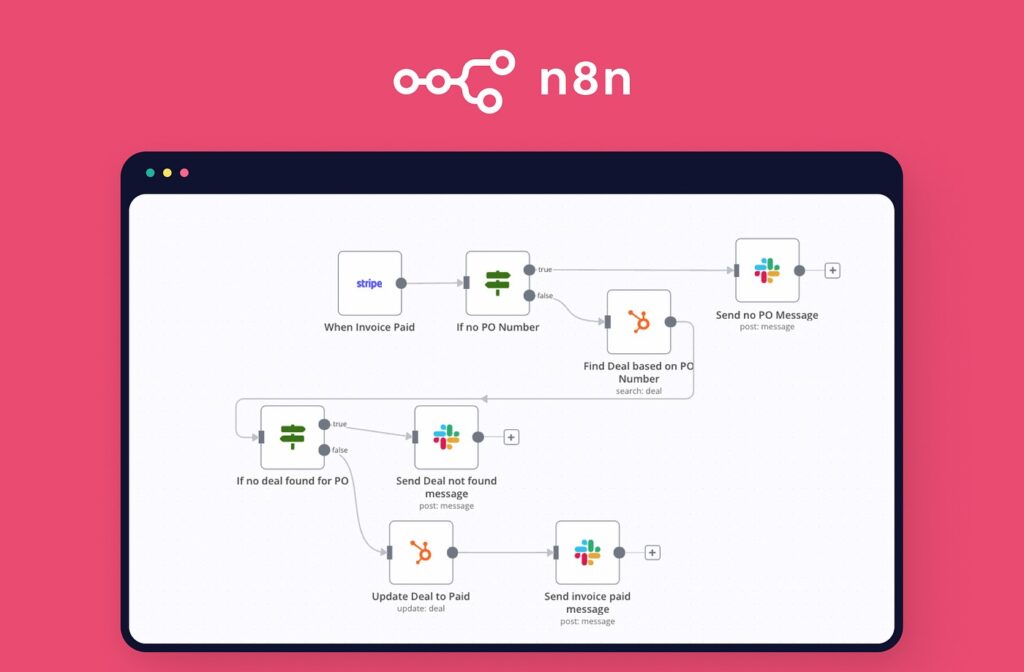
n8n is open source. You can self-host it on your own server, your own hardware, your own VPS. Your data never touches a third party platform. The software cost is zero. You pay only for hosting ($5 to $6/month on a basic VPS) and your own compute.
For developers, privacy-conscious businesses, agencies running high volume automations where per-task pricing is killing margins, and anyone in regulated industries where data sovereignty matters: n8n removes every ceiling the other two impose.
The self-hosted setup requires comfort with Docker, command lines, and basic server administration. If that sentence made you uncomfortable, n8n self-hosted is not your tool right now.
The n8n cloud version at $20/month removes the self-hosting requirement. You get a managed instance with 2,500 workflow executions. But you lose the cost advantage and the privacy guarantees that make n8n compelling in the first place. At $20/month with limited executions, n8n cloud competes directly with Make.com Pro at $16/month with more features. The self-hosted version is where n8n’s real value lives.
n8n’s Integration Story
400+ native integrations. That’s significantly less than Zapier’s 7,000+ and Make’s 1,800+. On paper it looks like a dealbreaker.
In practice it isn’t. n8n’s HTTP Request node lets you connect to virtually any API that exists. If a service has an API (and in 2026, almost everything does), you build the integration yourself. More work than clicking a pre-built connector. But it means n8n’s practical ceiling is unlimited for anyone comfortable making API calls.
For people building AI bots for local businesses, n8n’s flexibility with custom API connections is more useful than 7,000 pre-built integrations to tools your clients have never heard of.
n8n’s AI Capabilities: The Dark Horse
This is where n8n quietly leapfrogs both competitors.
n8n has native LangChain nodes for building sophisticated AI agent workflows. Chain different LLMs together, add retrieval augmented generation, build complex decision trees with AI at every step, create multi-model pipelines that would be impossible on Zapier and extremely difficult on Make. Pair it with a model like Claude Pro for the reasoning layer and n8n for the orchestration and you have a serious AI automation stack.
Zapier Copilot helps you build automations faster. n8n lets you build automations that think. That’s a different category.
n8n Community and Support
The self-hosted trade-off is support. Zapier and Make have dedicated support teams, live chat, and documentation written for non-technical users. n8n’s docs are solid but written for developers. When you get stuck, your options are the n8n community forum, the Discord server, and GitHub issues. The community is active and helpful. But if you’re used to clicking “Contact Support” and getting a human within an hour, the self-hosted experience will feel different.
n8n Cloud includes official support, which closes this gap if you’re willing to pay the $20/month.
Who Should Use n8n
You’re running high volume workflows where per-task pricing is killing your margins. Data privacy is non-negotiable (healthcare, legal, finance, EU compliance). You have the technical comfort to self-host and maintain a server. You’re building AI-powered workflows that need LangChain integration or custom model routing. You want the ceiling removed entirely and you’re willing to do the work to get there.
If you’re just getting started with automation, n8n is not your first tool. Start with Make.com. Learn what automation can do. Come back to n8n in six months when you know what you’re building and why.
Make.com vs Zapier vs n8n: The AI Agent Question
AI agents are starting to handle things that automation tools used to own exclusively.
OpenClaw can autonomously manage email, update CRMs, browse the web, and schedule follow-ups without a workflow being built at all. Claude Cowork lets you delegate multi-step tasks to an AI that plans and executes on its own. Hermes Agent builds its own reusable skills from experience.
Automation platforms aren’t going away. Agents need structured integrations and reliable triggers that tools like Make and n8n provide. But the division of labor is shifting. Routine, predictable workflows stay with Make/Zapier/n8n. Complex, judgment-dependent tasks increasingly go to agents.
Make and n8n are better positioned for this future because their architectures handle branching logic and AI model integration natively. Zapier’s linear model is harder to adapt. If the agent ecosystem matters to you (and it should), that’s another reason Make or n8n is the stronger long-term bet.
The line between automation tools and AI agents is blurring fast. If you want to understand where that shift is heading, our AEO guide covers how AI is changing the way content and tools get discovered.
Make.com vs Zapier vs n8n: Which One Should You Actually Use
Here’s the straight answer.
Start with Zapier if you’ve never automated anything, you need something working today, and your workflows are simple. It’s the easiest on-ramp that exists. Accept that you’ll probably outgrow it.
Switch to Make.com when your Zapier bill starts climbing, when your workflows need branching logic or error handling, or when you want to see what you’re building instead of scrolling through step lists. The learning curve is a few hours. The payoff lasts years. For most people reading this, Make.com is the right answer. Tools like Perplexity can handle the research step before your automation kicks in, saving even more time in the pipeline.
Look at n8n when you’re running volumes where per-task pricing is killing your margins, when data privacy is non-negotiable, when you’re building AI-powered workflows, or when you have the technical comfort to self-host. n8n is the power tool. Make sure you need a power tool before you buy one.
The path most people take: start on Zapier, migrate the complex or expensive workflows to Make once you know what you’re building, and revisit n8n when the business needs justify the technical investment. That path makes sense. You won’t lose anything by taking it one step at a time.
Make.com vs Zapier vs n8n FAQ: Pricing, Features and AI Capabilities
n8n self-hosted is free (you pay only hosting costs, roughly $5/month for a VPS). Make.com is next at $9/month for 10,000 operations. Zapier is the most expensive at $19.99/month for only 750 tasks. At scale, Make.com costs 5 to 7 times less than Zapier for equivalent workflows.
The software is free and open source. Self-hosting costs $5 to $15/month for a VPS. n8n Cloud (managed hosting) starts at $20/month with 2,500 executions. The meaningful cost advantage only exists with self-hosting.
Make.com handles everything Zapier does plus branching logic, parallel processing, and visual debugging. The integration library is smaller (1,800 vs 7,000) so check that your specific apps are supported before migrating. The migration is manual since there’s no import tool, but most people rebuild their workflows in a day.
The setup is guided, the interface is the simplest, and you can have a working automation in five minutes. Start there, learn what automation can do, then evaluate whether Make.com or n8n is worth switching to once you know what you need.
n8n by a significant margin. Native LangChain nodes, custom model routing, and the ability to build multi-model AI pipelines make it the strongest platform for AI-powered automation. Zapier Copilot helps you build automations faster but doesn’t help you build smarter ones.
Zapier and Make.com require zero coding. n8n cloud requires minimal coding. n8n self-hosted requires comfort with Docker, command lines, and basic server administration. None require you to be a developer, but n8n self-hosted expects you to be comfortable in a terminal.
All three can be triggered by or trigger AI agent actions through webhooks and API calls. Make.com and n8n integrate more naturally with agent workflows because of their branching logic capabilities. Zapier works but is more limited for complex agent orchestration.