










TL;DR: Claude Pro ($20/month) is the best AI subscription for writing, research, and long form reasoning in 2026. You get priority access to Opus 4.6 (Anthropic’s most capable model), Projects for persistent context, a 1 million token context window, and memory that carries across conversations. It outperforms ChatGPT Plus on nuanced writing, complex analysis, and tasks that require following detailed instructions over long outputs. Where it falls short: no native image generation, no web browsing in the base plan, and usage limits that can hit during heavy sessions. If your work involves writing, research, strategy, or code, Claude Pro is the subscription to get. If you mostly need image generation or real time web access, ChatGPT Plus is still the better fit.
Best for: Writers, researchers, and developers who use AI daily and need long-context reasoning, real-world task execution, and a model that requires 50% less editing than ChatGPT Plus on the same writing tasks.
Not ideal for: Users who need image generation, voice interaction, persistent memory across all conversations, or who only use AI a few times a week. The free tier covers casual use. Pro is for people who’ve already hit the free tier’s walls.
If you’ve been anywhere near the AI conversation lately you’ve heard the name Claude. Maybe a developer friend mentioned it. Maybe you saw it trending when OpenClaw blew up. Maybe you’re already paying $20 a month for ChatGPT and wondering if you’re leaving something on the table.
This is the review that answers that question properly. Not a spec sheet. Not a list of features copy pasted from the Anthropic website. A real breakdown of what Claude Pro actually is, what it does well, where it falls short, and whether your $20 a month is better spent here or somewhere else.
We’ve been using Claude Pro for over five months across a wide range of real work tasks. Here’s everything we found.
TL;DR: Claude Pro at a Glance
What is it? Anthropic’s $20/month paid AI assistant tier Best for: Writers, researchers, developers, content creators Strongest feature: Writing quality and long document analysis Biggest weakness: No image generation, no memory across new chats vs ChatGPT Plus: Better for text and code, weaker for multimedia Our rating: 4.4 out of 5
What Is Claude Pro?
Claude is an AI assistant built by Anthropic, a company founded in 2021 by former OpenAI researchers including Dario Amodei and Daniela Amodei. The company’s entire approach is built around one idea: that building AI carefully, with strong safety foundations baked in from the start, produces better and more trustworthy models in the long run. That philosophy shows up in how Claude actually behaves. It’s more measured, more honest, and less likely to confidently make something up when it doesn’t know the answer.
Claude Pro is the $20 per month paid tier. It sits above the free version and below the more expensive Max plans. It’s built for people who use Claude regularly enough to hit the free tier’s limits and want more capacity, faster responses, and access to the full model lineup.
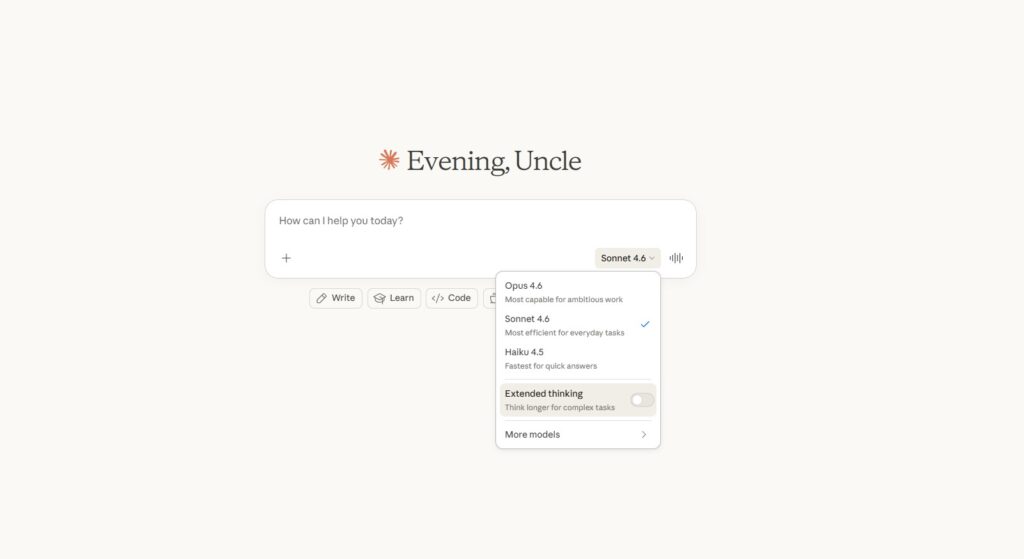
The Claude family currently runs three main models:
- Claude Haiku 4.5 — Fastest and most lightweight, built for quick tasks and simple questions
- Claude Sonnet 4.6 — The everyday workhorse, balanced between speed and intelligence, what most Pro users interact with by default
- Claude Opus 4.6 — The most powerful model for complex reasoning, deep analysis, and hard problems. Released February 2026 with a 1 million token context window and adaptive thinking capabilities
Pro users can switch between all three. Free users are limited to lighter models with less consistency.
Key Features of Claude Pro
5x More Usage Than Free
The free tier has strict daily limits that most regular users hit within a few hours of serious work. Pro gives you roughly 5x more capacity, which in practice means around 45 messages every 5 hours depending on message length and what models you’re using. For most users this is more than enough. Heavy users running long research sessions or Cowork tasks may still bump into limits on busy days.
Massive Context Window
| Plan | Context Window | Equivalent In Words |
|---|---|---|
| Claude Free | Limited | Varies |
| Claude Pro | 200,000 tokens | ~150,000 words (~500 pages) |
| Claude Max | 200,000 tokens | ~150,000 words (~500 pages) |
| Claude API | Up to 1,000,000 tokens | ~750,000 words |
This is one of Claude’s biggest practical advantages. You can upload an entire contract, a long research report, a full manuscript, and have a real conversation about all of it at once without Claude losing the thread halfway through.
Projects
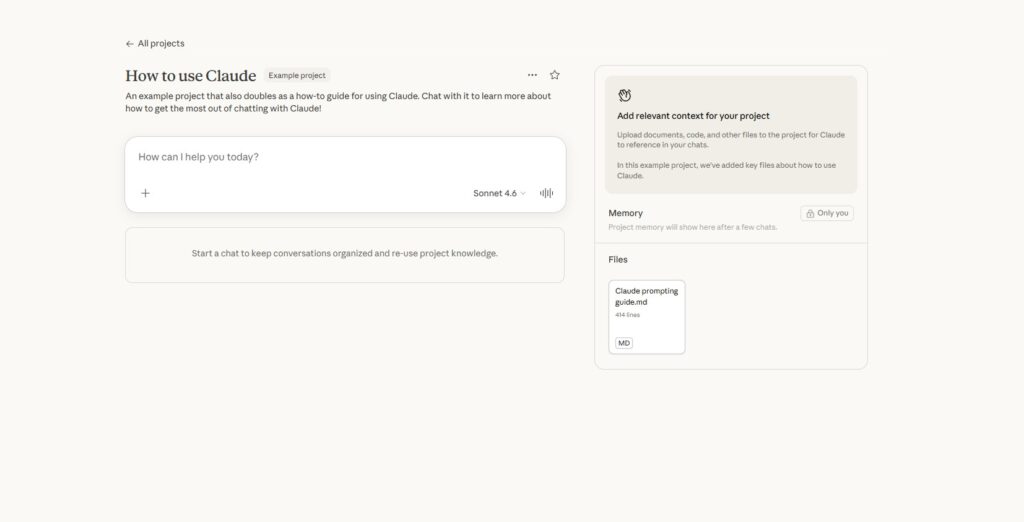
Projects are persistent workspaces where Claude remembers your documents, instructions, and preferences across every conversation within that project. Instead of re-explaining who you are and what you’re working on every time you open a new chat, you set it up once and Claude carries that context forward automatically.
Worth knowing: this is also where one of Claude’s most discussed limitations shows up. Outside of a Project, Claude does not remember previous conversations when you start a fresh chat. Each new session starts from scratch. If persistent memory across all your conversations is important to your workflow, this is something to factor in. ChatGPT has cross-session memory that Claude currently lacks outside of the Projects system.
Skills
Skills are reusable instruction sets you build once and trigger in any project. Create a skill for your writing voice, your formatting preferences, your workflow rules. Claude applies them automatically without you needing to repeat yourself every session. Think of it as training Claude on how you specifically like things done.
Artifacts
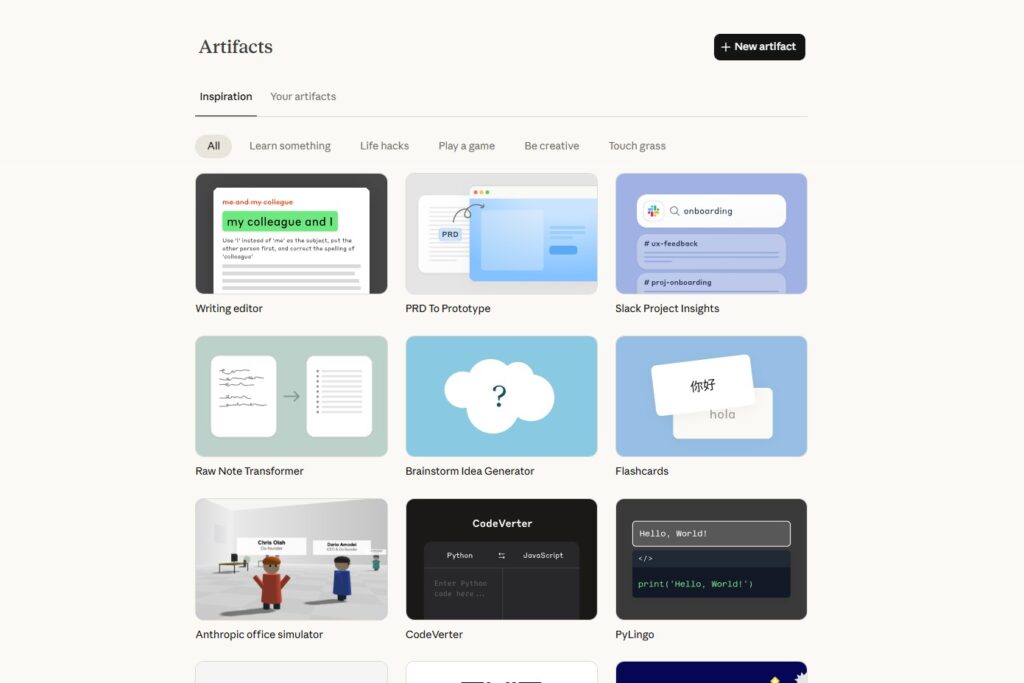
When Claude generates code, documents, or structured outputs they appear in a dedicated side panel called Artifacts. You can edit, refine, and iterate directly in that panel while keeping the conversation going. No copy paste loop, no losing your place. Changes happen live.
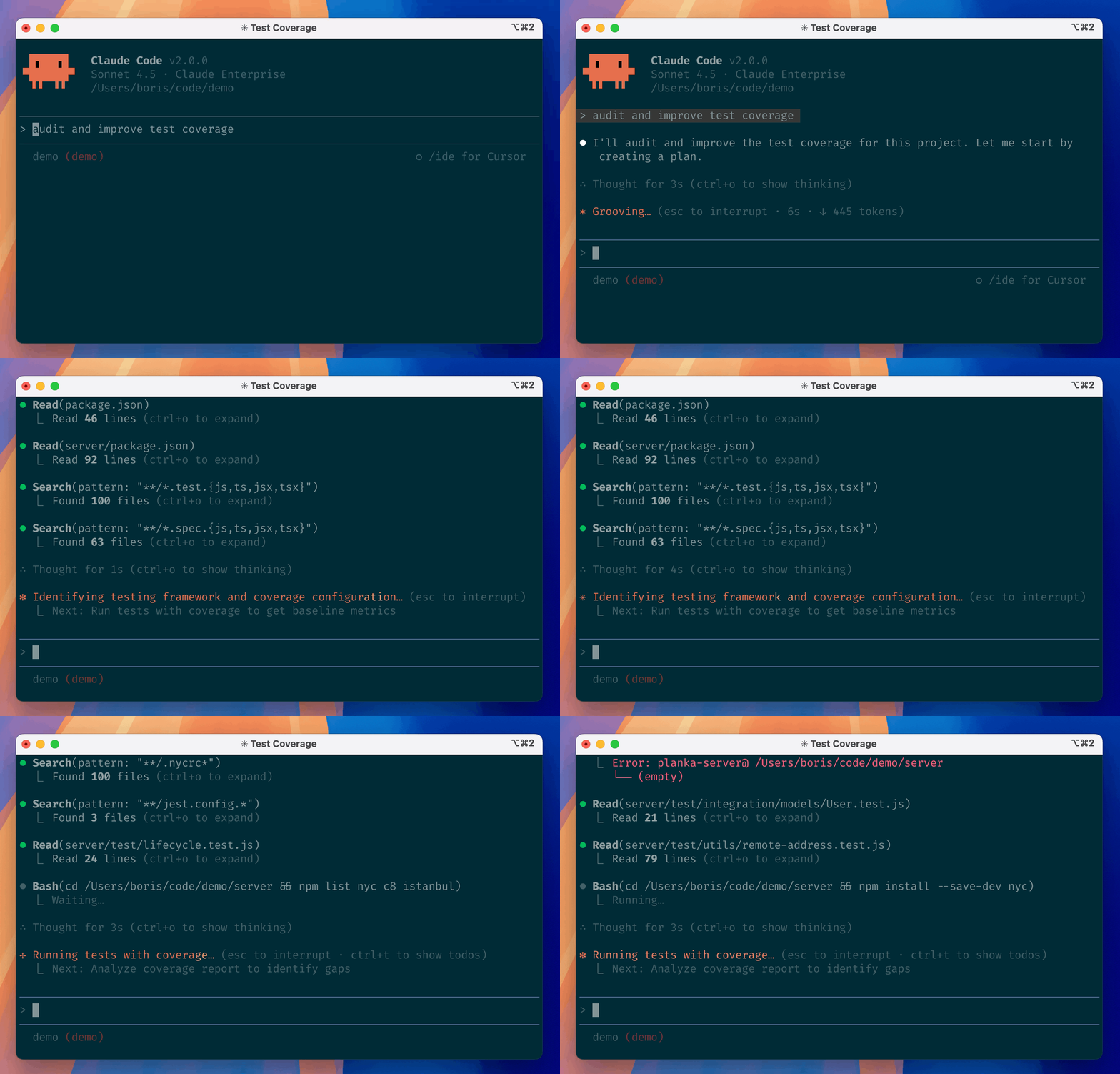
Claude Code is a command line tool included with Pro that connects Claude directly to your actual project files. It doesn’t just chat about code. It reads your codebase, runs commands, makes edits, and executes workflows autonomously inside your environment. For anyone who writes code as part of their work this is a genuinely significant capability that no competing tool at this price point comes close to matching.
Claude Cowork
Cowork is where Claude stops feeling like a tool you operate and starts feeling like something you can actually delegate to. Instead of prompting and correcting step by step, you describe the outcome, give it access to a folder or workspace, and step away. It plans the work, spins up multiple agents in parallel, and executes multi-step tasks on your behalf.
Important to note: Cowork is resource intensive and burns through your usage quota quickly. Heavy Cowork sessions on the Pro plan can hit limits faster than regular chat. Be deliberate about when and how you use it. Also be thoughtful about what folders and data you give it access to, especially anything sensitive.
Extended Thinking
For complex problems, Claude can show its full reasoning process before giving you an answer. You see the logic not just the conclusion. Particularly useful for analysis, strategic decisions, or any situation where you want to validate how it got to something rather than just accepting the output.
Integrations and Connectors
Claude Pro supports connections to Google Workspace, remote MCP connectors, and a growing catalog of third party tools. The connector ecosystem is expanding quickly and covers everything from AWS and n8n for workflow automation to Fellow.ai for meeting insights. Claude is coming to the iPhone through Apple’s new open Siri platform.
How Claude Pro Performs in Real Tasks
Writing and Content Creation
This is where Claude earns its reputation and where the difference between it and the competition is most immediately noticeable.
Claude’s default writing output doesn’t sound like it came from a machine. That sounds like a small thing until you’ve spent months cleaning up robotic phrasing, the overuse of transitional words, the formulaic structure that plagues most AI generated content. Claude varies sentence length naturally, avoids cliches, and handles tone with more nuance than any other model at this price point.
After five months of daily use across blog posts, newsletters, reviews, and research summaries, the honest assessment is this: Claude requires about 50% less editing to reach publishable quality compared to other tools. That time saving compounds fast if writing is a meaningful part of your work.
The Artifacts panel changes the editing workflow in a tangible way. Claude drafts in the side panel, you request changes in real time. “Make this punchier.” “Cut the intro.” “Add a hook.” Updates happen immediately without breaking the conversation.
One honest limitation here: Claude does not generate images. If your content workflow requires AI image creation you’ll need a separate tool. Claude can analyze images you upload but it won’t create them.
Long Document Analysis
Feed Claude a 50 page contract, a dense research report, a competitor’s pitch deck. Ask it to summarize the key points, flag potential issues, compare two documents side by side, or pull specific information from across the whole thing. The 200,000 token context window means it holds all of it at once and answers questions about the entire document, not just whatever section it can currently see.
This is one of the clearest practical advantages Claude has over competitors. For anyone who regularly works with lengthy business documents this feature alone can justify the subscription.
Coding and Development
Claude’s code output is consistently clean, well organized, and thoroughly documented. Independent testing has shown Claude maintaining test suites and handling complex refactoring tasks with higher accuracy than competing models at this price point.
Claude Code goes further by turning Claude into an autonomous coding agent that works directly inside your actual environment. Developers use it for debugging multi-file issues, refactoring codebases, writing tests, and managing git workflows. Non-technical users have built small business websites, internal tools, and simple automation scripts by describing what they want in plain language and letting Claude plan and execute the build.
One thing worth knowing: Claude’s code can run verbose. It adds documentation and error handling you didn’t explicitly ask for. For experienced developers this can feel like overkill. For people newer to code it’s useful context. Know your preference going in.
Research and Synthesis
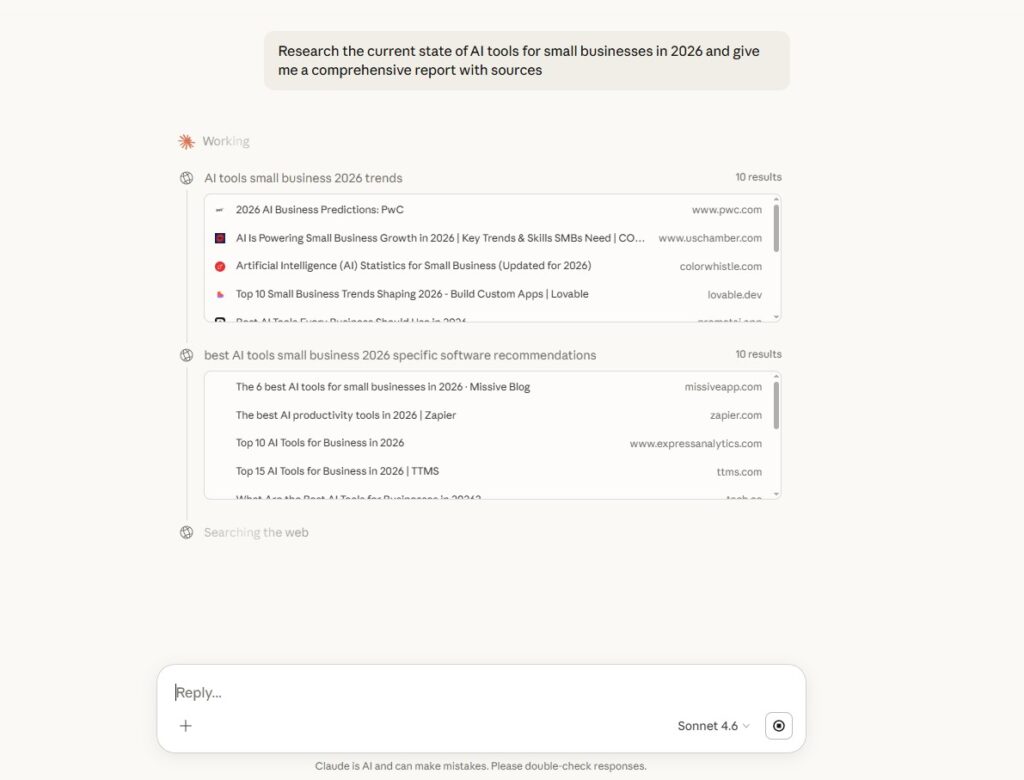
Claude’s deep research mode pulls from and synthesizes a genuinely impressive volume of sources. In comparative testing against other major AI tools, Claude pulled from nearly 500 sources in under five minutes compared to 17 to 100 for competing models. More importantly it turns that into a coherent narrative rather than a dry source list. For anyone optimizing content to get cited by AI search engines, this research capability pairs well with an answer engine optimization strategy.
Design Mockups and UI Work
One area where Claude genuinely surprises is design mockups and UI output via Artifacts. Compared to other AI tools at this price point the quality and attention to layout detail in Claude’s generated interfaces is noticeably stronger. For non-designers building quick prototypes, landing page mockups, or simple tool interfaces this is a practical advantage.
Reasoning and Analysis
Give Claude a complex problem with extended thinking turned on and the output is thorough, structured, and catches angles you hadn’t considered. It flags assumptions in your thinking. It doesn’t just validate whatever you came in with.
This honesty tendency is either a feature or an annoyance depending on how you use it. Claude will push back when it thinks you’re wrong. It’ll tell you when it doesn’t know something rather than inventing an answer. Anyone using it for serious analytical work finds this genuinely valuable.
Claude Pro Pros and Cons
| Pros | Cons |
|---|---|
| Best in class writing quality at $20 | No image generation |
| 200K token context window | No memory across new chat sessions outside Projects |
| Claude Code included at no extra cost | 100 image upload limit per day |
| Projects and Skills for persistent context | Usage limits feel tight during heavy Cowork sessions |
| Extended thinking shows full reasoning | Web browsing less polished than ChatGPT |
| Honest, pushes back appropriately | Smaller integration ecosystem than ChatGPT |
| Strong UI and design mockup output | No voice mode |
| Artifacts panel for live editing | Can be overly cautious on edge case prompts |
| Deep research synthesizes 500+ sources | Code output can be overly verbose |
What real users say: “Claude is exceptional for web programming. Where it excels over competition is its ability to take into account design principles and user experience practices without needing them explicitly explained.” — G2 reviewer
The honest critique: “If you plan to use Claude for every stage of development it can become expensive. Learning to create effective prompts takes time and design results can differ from expectations.” — G2 reviewer
Claude Pro Pricing and Plans (2026)
| Plan | Price | Best For | Key Inclusions |
|---|---|---|---|
| Free | $0/month | Testing and casual use | Basic access, strict daily limits, lighter models |
| Pro | $20/month ($17 annually) | Daily users, creators, researchers | 5x usage, all models, Projects, Skills, Claude Code, Cowork, Artifacts, Google Workspace |
| Max 5x | $100/month | Power users hitting Pro limits | 5x Pro usage, all Pro features, more consistent Opus access |
| Max 20x | $200/month | Heavy all-day professional use | 20x Pro usage, maximum availability |
| Team | $30/seat/month | Teams of 5 or more | Shared Projects, admin controls, SSO, centralized billing |
| Enterprise | Custom pricing | Large organizations | GitHub integration, 500K context window, compliance controls, audit logs |
Which plan should you choose?
The free plan is fine for experimenting. You’ll hit the walls quickly if you’re doing any serious writing, research, or coding work.
Pro at $20 is the sweet spot for individual users who rely on Claude regularly. Five months of daily use across content creation, research, and analytical work and Pro handles it well, with the occasional exception during very heavy Cowork or deep research sessions.
Max makes sense if you’re genuinely in Claude for most of your working day or running large autonomous Cowork projects on the regular. At $100 a month it needs to be saving you meaningful time to justify itself.
Claude Pro vs ChatGPT Plus: The Real Comparison
Both cost $20 a month. Both give you access to top tier AI models. The honest answer to which one wins depends entirely on what you use it for.
| Feature | Claude Pro | ChatGPT Plus |
|---|---|---|
| Monthly price | $20 | $20 |
| Writing quality | ⭐⭐⭐⭐⭐ | ⭐⭐⭐⭐ |
| Context window | 200K tokens | 128K tokens |
| Image generation | ✗ | ✓ DALL-E included |
| Voice mode | ✗ | ✓ Advanced Voice Mode |
| Coding quality | ⭐⭐⭐⭐⭐ | ⭐⭐⭐⭐ |
| Web browsing | Limited | Strong via Bing |
| Long document analysis | ⭐⭐⭐⭐⭐ | ⭐⭐⭐⭐ |
| UI and design mockups | ⭐⭐⭐⭐⭐ | ⭐⭐⭐ |
| Research synthesis | ⭐⭐⭐⭐⭐ | ⭐⭐⭐⭐ |
| Cross-session memory | ✗ | ✓ |
| Autonomous agent | ✓ Cowork | Limited |
| Integration ecosystem | Growing | Extensive |
Claude wins for: writing quality, long document analysis, coding, reasoning depth, UI mockups, research synthesis.
ChatGPT wins for: image generation, voice interaction, web browsing, cross-session memory, third party integrations.
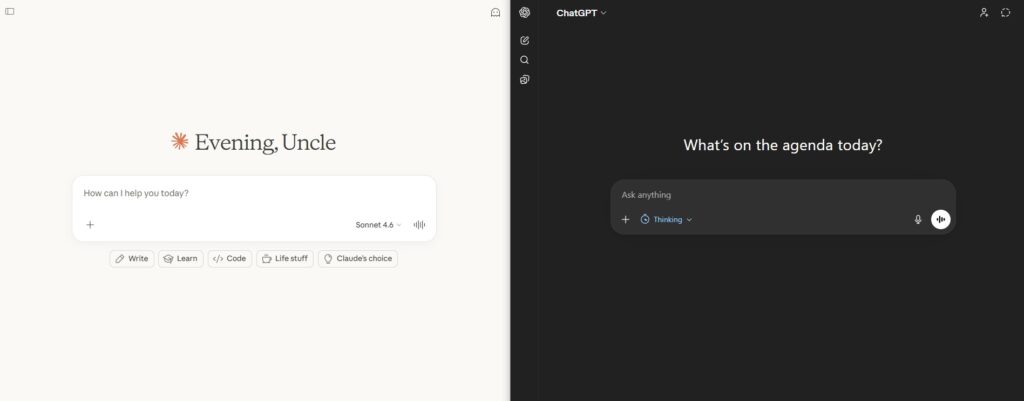
The bottom line: If your work lives in text and code, Claude Pro is the better $20. If you need the full multimedia toolkit or rely on voice and image generation, ChatGPT Plus serves those needs better at the same price. A lot of serious AI users end up paying for both. The combined $40 is hard to argue with if AI tools are central to how you work. And if search is your main use case, check our Perplexity review instead.
Claude Pro Use Cases for Regular People
| User Type | Should They Use Claude Pro? | Why |
|---|---|---|
| Writers and content creators | ✓ Strongly yes | Best writing quality at this price, Artifacts workflow, natural tone |
| Developers and coders | ✓ Strongly yes | Claude Code is a genuine advantage, clean output, strong reasoning |
| Researchers and analysts | ✓ Yes | 200K context window, 500+ source synthesis, extended thinking |
| Small business owners | ✓ Yes | Document analysis, content creation, automation workflows |
| Students | ✓ Yes | Reasoning assistance, writing quality, research synthesis |
| Casual users | Try free tier first | May not hit limits that justify paying |
| Image and video creators | ✗ Not as primary tool | No image or video generation, use ChatGPT Plus or Midjourney |
| Voice interface users | ✗ No | Claude has no voice mode |
Real Use Cases for Regular People
Content and Newsletter Workflow
Set up a Project with your writing style guidelines, your content pillars, and examples of your best past work. Every new piece starts with Claude already knowing your voice, your tone, and your audience. Use Skills to enforce specific formatting rules automatically. Draft in Artifacts so edits happen live without breaking your session. This workflow cuts production time significantly compared to starting from scratch every time. Pair it with an automation platform to really unlock the value.
Business Document Analysis
Upload a contract, a vendor proposal, a competitor’s pitch deck. Ask Claude to summarize the key points, flag anything unusual, compare it against a previous version, or pull specific clauses. The 200K context window handles documents that would trip up shorter context models entirely. For anyone who regularly deals with lengthy business documents this use case alone justifies the subscription.
Deep Research Reports
Give Claude a topic, a set of source documents, or a complex question. Turn on extended thinking. Ask it to synthesize everything into a structured report with sources cited. The output is thorough, well organized, and shows its reasoning in a way that makes it easy to validate and build on.
Building Simple Tools Without Being a Developer
Using Claude Code, non-technical users have built landing pages, small web tools, expense trackers, and internal dashboards by describing what they want in plain language. Claude plans the project, breaks it into steps, and guides the build. For small business owners and solo founders this is one of the most compelling value propositions at any price point.
Claude Pro FAQ: Pricing, Limits, and How It Compares
For writers, researchers, developers, and content creators who use AI daily, yes. Claude Pro gives you 5x the usage of the free tier, access to Claude Opus 4.6 (the most capable model), 200K context window, Projects for organized workflows, and early access to new features like Claude Code. If you only use AI occasionally, the free tier is enough.
Not automatically across conversations. Each new chat starts fresh. However, Claude Pro includes Projects, which let you upload reference documents and set custom instructions that persist across every conversation within that Project. This gives you functional memory within a defined workspace, just not automatic memory across random chats.
Claude Pro costs $20 per month and gives you 5x the free tier usage. Claude Max costs $100 or $200 per month and gives you 20x or unlimited usage respectively, plus higher priority access during peak times. Max is designed for heavy daily users who regularly hit Pro’s usage limits, especially developers using Claude Code extensively.
No. Claude Pro cannot generate, create, or edit images. It can analyze and describe images you upload, but it has no image generation capability. If you need AI image generation, you will need a separate tool like Midjourney, DALL-E, or Stable Diffusion.
Claude Pro supports uploading multiple images per conversation for analysis, description, and extraction. There is no hard per-image limit, but very large images or many images in a single conversation will consume more of your context window, which can reduce the quality of responses later in that conversation.
Claude Code has a learning curve. It runs in a terminal and requires basic comfort with command line tools. Complete beginners can start with Claude Pro’s regular chat interface, which requires no technical knowledge. Claude Code is best suited for developers or technically curious users who want to use Claude for coding, file management, and automation tasks.
Claude Pro gives you 5x the message limit, access to Claude Opus 4.6 (the most powerful model), 200K token context window (vs shorter on free), Projects for persistent workspaces, priority access during high traffic, and early access to new features like Claude Code and Cowork. The free tier uses Claude Sonnet with shorter context and stricter rate limits.
The Verdict
Claude Pro is the best $20 per month AI subscription for writing, research, and coding. It isn’t the most feature rich option at this price. It doesn’t generate images, it doesn’t do voice, its web browsing isn’t as polished as the competition, and it doesn’t remember you when you start a new chat outside of a Project.
What it does, it does better than anything else in its class. The writing quality is genuinely different. The context window is larger. The reasoning is more careful. The coding output is cleaner. The design mockups are stronger. And the Projects and Skills system means it gets more useful the longer you work with it, building up context and understanding of how you operate. If persistent memory across sessions is the priority, Hermes Agent takes that concept further with a self-improving skill system that runs on your own hardware.
If your work lives in text and code, $20 a month is an easy call. If you need the full multimedia toolkit, start with ChatGPT Plus and come back to Claude when writing quality and depth of reasoning become the priority.