










A guide for setting up a spare Mac for Claude Code to fully control is trending on Hacker News, and it marks a shift: regular people now give AI agents dedicated hardware. An old Mac becomes an always-on machine Claude Code operates, computer use enabled, reachable from your phone or over SSH. Isolation is the logic: risky autonomous work happens on a machine that isn’t yours, holding nothing you’d miss. Reality includes some macOS fights (power management, dying sessions) with known fixes, plus security rules that aren’t optional. Anthropic sells the managed version of this exact idea as Cowork remote sessions. So the DIY route is for tinkerers who want control and zero extra fees. Best for: anyone with an unused Mac and curiosity. Not ideal for: anyone who skips the safety section.
Think about what happens when a company hires someone. They get a desk, a machine, credentials, and a list of tasks. Nobody lends the new hire their personal laptop.
The AI rollout just reached that stage, one household at a time.
The number five story on Hacker News today is a step-by-step guide for handing your spare Mac to Claude Code. Full control, computer use enabled, always on, reachable from your phone while you’re in line at the grocery store. Written by developer YK Sugishita (ykdojo), it’s the clearest public version yet of something tinkerers have been quietly assembling for months.
The AI got a body. Turns out a spare Mac for Claude Code was hiding in your closet the whole time.
The Spare Mac for Claude Code Setup, Explained
The guide itself walks through converting an unused Mac into a dedicated machine that Claude Code operates independently.
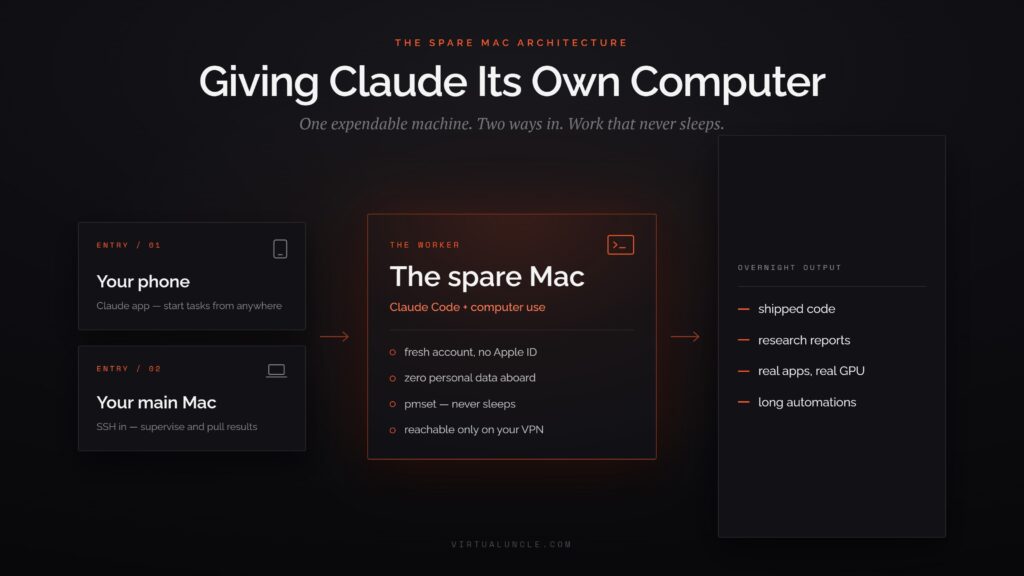
Once running, you message it from the Claude mobile app or connect over SSH from your main computer. Hand it tasks and let it work: research projects, coding jobs, long automations, all on hardware you’re not touching.
The author’s reasoning is worth quoting in spirit: he wanted to delegate tasks he didn’t want running on his own machine. Claude Code has a flag that skips permission prompts entirely, which makes it dramatically more autonomous and dramatically less supervised. Running that on the computer holding your tax documents and photo library takes more faith than most people should have.
The pattern echoes something sysadmins learned decades ago: never test in production. Your daily computer is production. A separate machine dissolves the problem. The agent gets full independence inside a box where the worst case is reinstalling macOS on a laptop you’d forgotten you owned.
There’s a bonus reason people love it. The Hacker News thread is full of people noting that Claude Code from a phone often beats the regular Claude app. It can execute, browse, and build rather than just chat. The spare machine turns your phone into a remote control for a full computer-driving agent.
Why a Whole Computer Instead of a Sandbox
Fair question. Developers already isolate risky code in containers. The guide’s author literally built container tooling for Claude Code before abandoning that approach for this one.
His answer covers the gaps. A container still runs on your main machine, so its network traffic flows through your connection and its misbehavior shares your hardware. And containers can’t do everything a real computer can. His example: he wanted the agent running Unity for game development, which a container can’t reasonably host. Real screen, real apps, real GPU. Some work needs an actual computer, so the agent gets an actual computer.
The guide also answers the obvious 2026 question: why not just run OpenClaw, the assistant framework we’ve covered in depth? The author’s reasons are practical rather than tribal. He wants the full, latest Claude Code feature set, control from the official Claude app, and his existing Claude subscription covering the usage. Different tools, same architecture lesson: broad-permission agents belong on machines with nothing to lose.
There’s also the always-on economics, and this is the argument that converts people. Your main machine sleeps, travels, and reboots. A dedicated spare sits plugged in with the lid open, which means tasks keep running at 2am and finish before you wake up. That’s the property people are actually chasing: not a smarter AI, an AI with hours.
What the Setup Involves (Plain English Version)
We’re not reproducing the full tutorial, the guide does that well. But here’s the shape of it so you know what you’re signing up for.
You create a dedicated environment on the spare Mac with its own accounts and access. You enable remote connections so your other devices can reach it, then install Claude Code with computer use enabled. The connective tissue is standard remote-access plumbing: SSH for terminal control from your main machine, and the Claude app pairing for phone access.
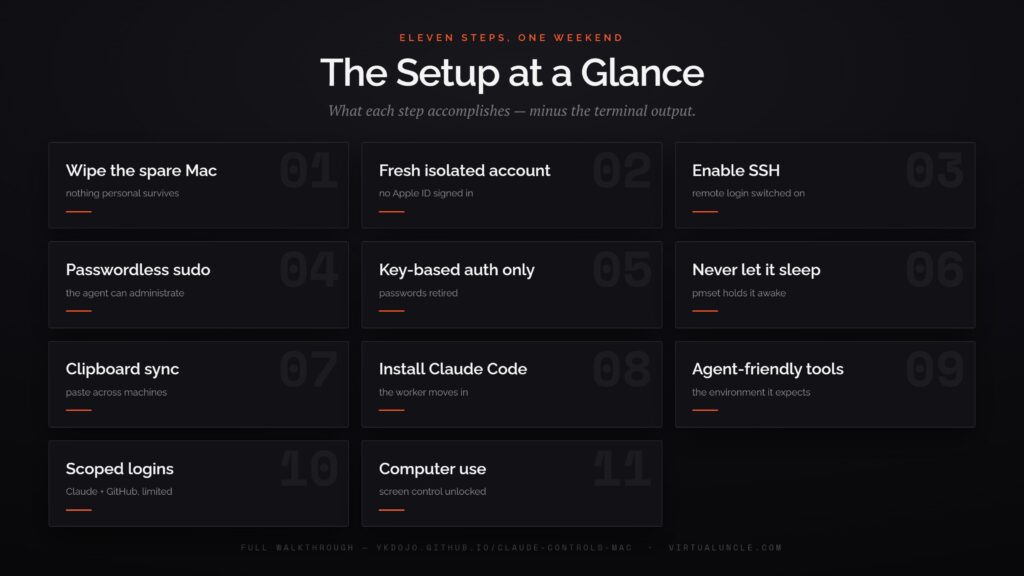
The guide’s author is candid that his exact recipe assumes two Macs, but the architecture transfers. What matters is the shape: an expendable machine, remote access you control, and an agent with room to work.
Then come the tricks that make it livable, which the community has been refining in troubleshooting threads all week. Run sessions inside tmux so disconnecting doesn’t kill the agent’s work. Use a mesh VPN like Tailscale instead of exposing the machine to the open internet. Configure macOS power settings so the system doesn’t put your employee to sleep mid-task.
Hardware requirements are forgiving. Any Mac that runs a recent macOS works. The guide notes the pattern applies to any two machines, so a dusty Windows tower or mini PC can play the same role with adjusted plumbing. The always-on part costs pennies in electricity at idle, though not zero. A machine with a broken screen or dead battery is perfectly qualified for the job.
Total time for a comfortable person: an afternoon. For everyone else: a weekend with some swearing, which brings us to the honest section.
What People Are Actually Running on These
The thread and the author’s broader tips collection sketch what a house agent does all day, and it’s more varied than coding.
Overnight work is the anchor use case. Hand it a refactor, a research job, or a batch of test runs before bed, then read results over coffee. The author’s own trigger was game development, wanting an agent that could operate Unity, which no sandbox could host. Others run theirs as a standing research assistant, reachable from a phone, that can actually open sites and compile findings instead of chatting from memory.
The power-user pattern goes a layer deeper. A supervisor Claude on your main machine delegates to the worker on the spare, checks its output, and pulls results back. Auto modes with command review handle the middle ground, running autonomously but pausing on anything risky.
None of this strictly requires being a developer. It requires having tasks worth delegating and the patience to describe them well, which is the same skill every agent product is quietly selecting for.
What It Costs to Run
The machine is free if you own it, so the real bill is usage, and here the answer is friendlier than expected.
Claude Code runs on the same subscription you may already pay for. Its usage limits are the practical ceiling on how much your house agent works. Heavy overnight delegation eats limits faster than chatting does. Know that before you queue six research projects and wonder why Tuesday feels rationed. Plans scale up for the obsessed, and the tinkerer crowd increasingly mixes in open models for grunt work to stretch the budget.
Electricity rounds to a few dollars a month for a Mac idling with bursts of work. Compare the whole stack against the $100 to $200 managed tiers and the spare machine wins on price the moment it exists. What it costs instead is attention: updates, restarts, the occasional mystery. Owning the means of production was never maintenance-free.
The Part Where macOS Fights Back
Nobody in the threads pretends this is plug and play, and the failure list is consistent enough to be a genre.
SSH connections fail silently. Permission prompts the setup depends on sometimes never appear. macOS power management kills background processes with prejudice. The operating system assumes an unattended computer should sleep, and this project’s entire premise is an unattended computer that doesn’t. Sessions die the moment you log out unless you’ve wrapped them properly.
Every one of these has a known fix (that’s what the troubleshooting guides are for), but go in expecting friction. Apple built macOS for humans at the keyboard. You’re configuring it for a resident who never leaves and never sleeps, and the OS finds that suspicious at every turn.
One more expectation to set: this is a living setup, not an appliance. macOS updates change permission behavior, Claude Code updates change flags, and the community guides update in response. Bookmark the troubleshooting thread along with the tutorial, because six months of OS updates will eventually break something a Sunday morning can fix.
Frankly, it should. Which is a nice segue.
The Safety Rules That Are Not Optional
An always-on machine an AI controls, reachable from the internet, is a real attack surface. Treating it casually is how fun projects become incident reports.
The community consensus rules, and ours: key-based authentication only, never passwords. No ports exposed to the open internet, ever. The mesh VPN approach exists precisely so the machine is reachable by you and invisible to everyone else. The agent’s accounts should be its own, created for it, with access to nothing you’d mourn. Your email, your banking, your main Apple ID have no business on that machine.
And understand the newest risk class before you delegate browsing tasks: agents that read the web can be manipulated by what they read. A malicious page can try to steer an autonomous agent into actions you never asked for. Isolation limits the damage, which is half the reason this whole architecture is right. The other half is you reviewing what came back before acting on it.
Think in Blast Radius
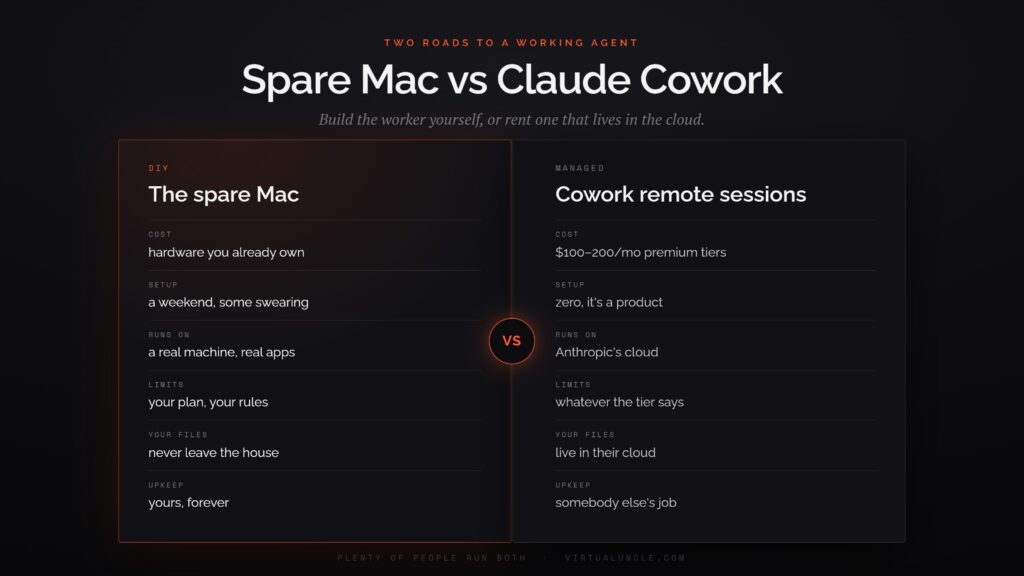
Then think about blast radius before granting anything. The question for every permission is simple: if this went maximally wrong, what would it cost me? Answers you can live with get approved. Answers involving your savings or your identity get their own dedicated accounts or a hard no.
Scope the credentials like you’d scope a contractor’s. If the agent needs GitHub, give it a token limited to the repos it works on. If it needs a browser, let it have accounts created for it, not your logged-in everything. And build the review habit early: skim what it did, not just what it produced. An agent’s work log is where surprises announce themselves politely before they announce themselves expensively.
None of this should scare you off. It’s the same posture as locking a car: routine, boring, and the entire difference between fine and not.
Or Skip the Weekend and Pay Instead
Here’s the context the guide doesn’t dwell on: the industry noticed this demand months ago and productized it.
Anthropic’s own managed version is Cowork with remote sessions, which we covered when it escaped the desktop. Your tasks run on Anthropic’s side, continue with your laptop closed, and follow you across devices. The super app war is substantially a fight over exactly this convenience, with OpenAI’s ChatGPT Work chasing the same always-working promise.
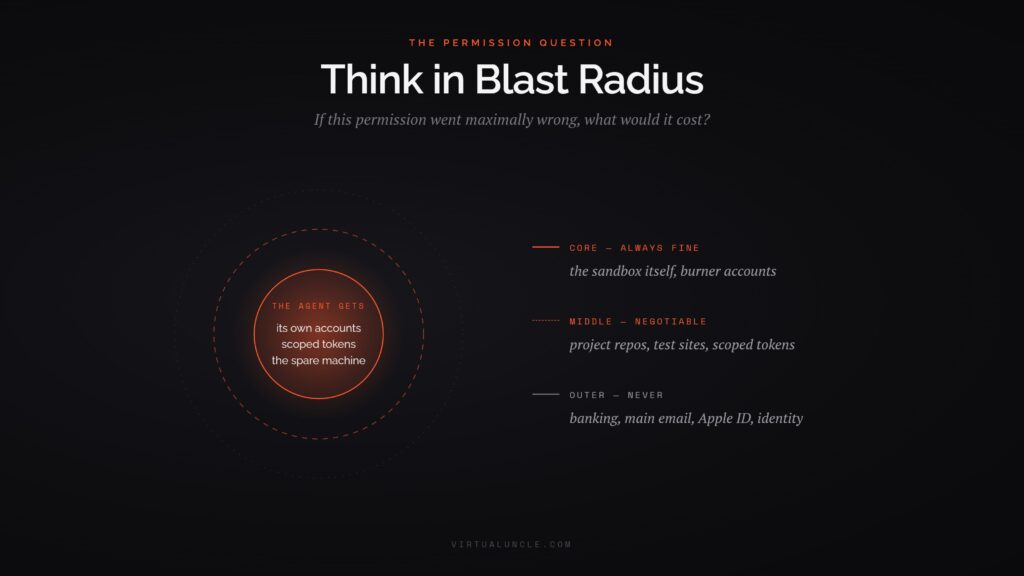
A short tradeoff table settles it. Paid: $100 to $200 a month on premium tiers, zero setup, someone else’s cloud, someone else’s limits. DIY with a spare Mac for Claude Code: a machine you already own plus a weekend, a real computer with real apps, and nobody’s usage caps or feature roadmap. Your files stay in your house.
One more wrinkle in the comparison: the two paths aren’t exclusive. Plenty of people in the thread run Cowork for polished delegation and the spare machine for the messy, experimental, or private work. The managed product handles the errands. The house machine handles the projects.
Different people land differently, and that’s fine. The interesting fact is that both paths now exist, and the free one is a trending tutorial rather than a research paper.
Who Should Do This (And Who Shouldn’t)
The honest sorting, since a trending tutorial makes everything look mandatory.
Do it if a spare Mac is already sitting in a drawer and the terminal doesn’t scare you. The other requirement is real recurring tasks to delegate. The setup cost pays off only if the machine works regularly. A dedicated agent computer that runs one demo is a very elaborate paperweight.
Skip it, at least for now, if the terminal is hostile territory. The managed products exist for you, and the Claude subscription tiers we’ve reviewed keep pulling agent features downmarket. The DIY gap narrows every quarter, so following a fresh guide six months from now will be easier than following this one today.
And wait entirely if your interest is mostly vibes. The spare Mac for Claude Code setup rewards people who show up with a task list. Without one, you’ll spend a weekend building an employee with nothing to do, and it won’t even gossip by the coffee machine.
The Trend Underneath the Tutorial
Zoom out, because the spare Mac is one entry in a pattern that got unmistakable this month.
An open source hardware gadget that gives agents physical control of any computer launched on Product Hunt last week. Anthropic untethered Cowork from the desktop. OpenAI shipped a desktop super app. Guides like this one, and the broader Claude Code tooling ecosystem we’ve covered, keep lowering the floor. Every version of the same idea: agents stop borrowing your computer and start having their own.
The money agrees with the trend, loudly. Claude Code’s revenue reportedly ran from $1 billion to over $2.5 billion annualized in about two months this summer. That’s what happens when a developer tool quietly becomes a general purpose worker. Tutorials like this one are the consumer edge of that curve: the same engine, pointed at household tasks, running on hardware from the closet.
That’s the actual milestone hiding in a weekend tutorial. The chatbot era ran on a shared machine, yours, with the AI as a guest process you watched. The agent era runs on delegated machines, physical or cloud, with the AI as a resident you check in on. Employee onboarding, at household scale.
There’s a decent chance you’ll look back on this tutorial the way people look back at early home wifi guides: fiddly instructions for a thing that later became a checkbox. The direction only runs one way from here.
The spare Mac in your closet spent three years waiting for a purpose. It just got a job offer.